Introduction

Alberto Ferrari
Ingegneria dell'Informazione, UniPR
Bluej

  • A free Java Development Environment designed for beginners, used by millions worldwide
  • Created by University of Kent
  • Supported by Oracle
  • "One of my favourite IDEs out there is BlueJ"
    • James Gosling, creator of Java.

Download Bluej

Object Oriented Programming in Java

Objects and Classes

  • objects
    • represent things from the real world, or from some problem domain
    • (example: “the yellow bike with basket”)
  • classes
    • represent all objects of a kind (example: “bike”)

Objects and Classes

  • Java objects model objects from a problem domain.
  • Objects are created from classes.
    • The class describes the kind of object;
    • the objects represent individual instantiations of the class.
  • We can communicate with objects by invoking methods on them.
    • Objects usually do something if we invoke a method.
  • Methods can have parameters to provide additional information for a task.
  • The header of a method is called its signature.
    It provides information needed to invoke that method.
  • Parameters have types.
    • The type defines what kinds of values a parameter can take.

Convention

  • start names of classes with capital letters
  • and names of objects with lowercase letters
  • This helps to distinguish what we are talking about.

List of Java datatypes

exercise

  • Start BlueJ and open the example named figures
    • Create some objects from class Circle
    • Invoke the changeColor method on one of your circle objects and enter the string "red". This should change the color of the circle. Try other colors.
    • See what happens when you specify a color that is not known.
    • Invoke the changeColor method, and write the color into the parameter field without the quotes. What happens?
    • Create several circle objects on the object bench. You can do so by selecting new Circle() from the pop-up menu of the Circle class. Make them visible, then move them around on the screen using the “move” methods. Make one big and yellow; make another one small and green. Try the other shapes too: create a few triangles, squares, and persons. Change their positions, sizes, and colors.

Multiple instances & state

  • Multiple instances.
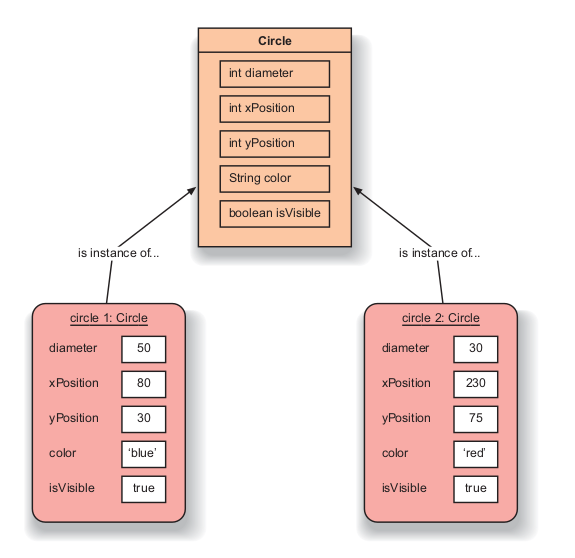
    • Many similar objects can be created from a single class.
  • Objects have state.
    • The state is represented by storing values in fields (attributes).
  • The class defines what fields an object has, but each object stores its own set of values (the state of the object).

exercise

  • Make sure you have several objects on the object bench, and then inspect each of them in turn.
  • Try changing the state of an object (for example, by calling the moveLeft method) while the object inspector is open.
  • You should see the values in the object inspector change.

Class & Objects

Java code

  • Select Show Terminal from the View menu.
  • Then select Record method calls from the terminal’s Options menu.
  • Now create a few objects, call some of their methods, and observe the output in the terminal window.

Something like this

Person person1 = new Person();
person1.makeVisible();
person1.moveRight();

Write your code

  • Select Show Code Pad from the View menu.
  • This pane is the Code Pad.
  • You can type Java code here.

try

Person myPerson = new Person();
myPerson.makeVisible();
myPerson.moveRight();

Tip You can recall previously used commands in the Code Pad by using the up arrow.

Source code and method calling

  • Method calling
    • Objects can communicate by calling each other’s methods.
  • The source code of a class determines for each of the objects of that class.
    • the structure (fields)
    • and behavior (methods)

In Bluej the pop-up menu of a class has an option labeled Open Editor.
This will open a text editor displaying the source code of the class.

Java life cycle

Compiler

  • About compilation
    • If we use a “higher-level” programming language such as Java.
      A computer cannot execute Java source code directly.
    • The compiler translates the Java code into machine code.
    • If we change the source code, we must run the compiler before we can use the class again to create an object.

exercise

  • Use Project House
  • In the source code of class Picture, find the part that actually draws the picture. Change it so that the sun will be blue rather than yellow.
  • Add a second sun to the picture.
  • Add a sunset to the single-sun version of Picture. That is, make the sun go down slowly.
    • Remember: The circle has a method slowMoveVertical that you can use to do this
  • Exercise If you added your sunset to the end of the draw method (so that the sun goes down automatically when the picture is drawn), change this now.
    • We now want the sunset in a separate method, so that we can call draw and see the picture with the sun up, and then call sunset (a separate method!) to make the sun go down
  • Exercise Make a person walk up to the house after the sunset

Return value

Use lab-classes project and look at code

  • Result.
    • Methods may return information about an object via a return value.
    • (The word void indicates that a method does not return any result)

Objects as parameters

  • Objects can be passed as parameters to methods of other objects

Terms introduced in this chapter

  • object
  • class
  • instance
  • method
  • signature
  • parameter
  • type
  • state
  • source code
  • return value
  • compiler

Summary (1)

  • object
    • Java objects model objects from a problem domain.
  • class
    • Objects are created from classes. The class describes the kind of object; the objects represent individual instantiations of the class.
  • method
    • We can communicate with objects by invoking methods on them. Objects usually do something if we invoke a method.
  • parameter
    • Methods can have parameters to provide additional information for a task.
  • signature
    • The header of a method is called its signature. It provides information needed to invoke that method.

Summary (2)

  • type
    • Parameters have types. The type defines what kinds of values a parameter can take.
  • multiple instances
    • Many similar objects can be created from a single class.
  • state
    • Objects have state. The state is represented by storing values in fields.
  • method calling
    • Objects can communicate by calling each other’s methods.
  • source code
    • The source code of a class determines the structure and behavior (the fields and methods) of each of the objects of that class.
  • result
    • Methods may return information about an object via a return value.

Alberto Ferrari
Ingegneria dell'Informazione, UniPR
www.ce.unipr.it/~aferrari/